
On the Virtual Accounts page in AI Trading Journal, working side by side with AI Strategy Studio, you can trade live market prices with virtual money (both manually and with automated strategy runs). Unlike standard broker demo accounts that have no risk limits and mix test trades with serious runs, every virtual account lets you set realistic broker costs (spread, commission and overnight swap) and a daily loss limit, separate your manual changes from the untampered strategy result, and publish a tamper-proof public track record locked with SHA-256 cryptography.
Example: you create a $10,000 virtual account with the Raw-ECN cost profile and a 3% daily loss limit, run both manual paper trades and your strategy on it, and share its verified public link at the end of the month to prove your track record without risking a dollar of real money.
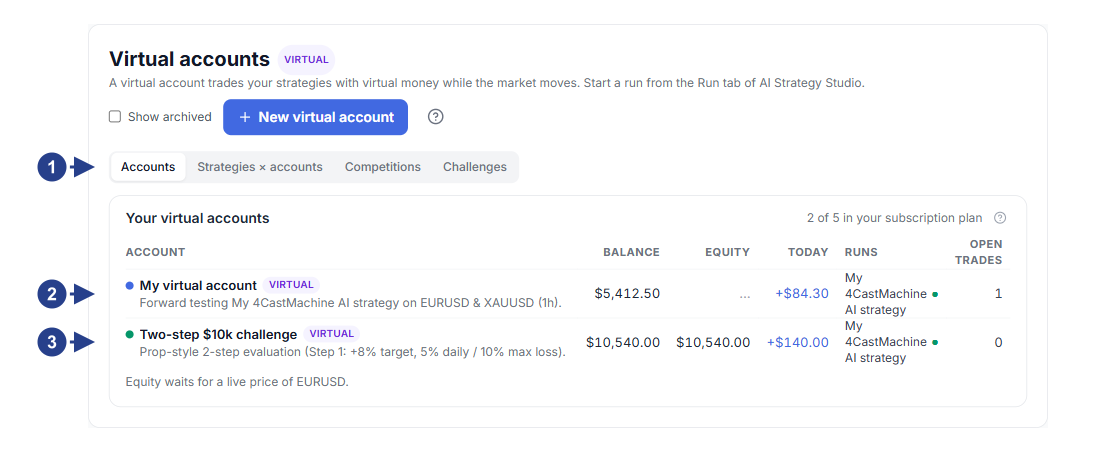
Tabs for the four main sections: Accounts, Strategies × accounts, Competitions and Challenges.
The + New virtual account button in the top right for creating a new virtual account.
Each virtual account card showing current balance, total profit or loss, drawdown, active strategy count and account status.
Quick-start card for launching a prop-firm challenge or opening account details.
What you can do in Virtual Accounts
Risk-free manual trading (Paper Trading): just like a real trading account, open buy or sell trades on live market prices, calculate lot size from your risk percentage, and manage open trades right on the chart.
Live strategy forward testing: run strategies built in AI Strategy Studio on one or more virtual accounts to test their real performance with realistic spread, commission and overnight swap costs.
Separating strategy performance from manual changes (shadow trades): whenever you use the Manage menu in the Open trades table to close a strategy trade early (Close now) or move its stop loss to entry (Move SL to breakeven), the system tracks the original strategy outcome in the background and shows in What if you didn't touch it? how many dollars your manual action added or removed.
Prop-firm challenge practice and risk limits: before paying for a prop-firm challenge, practice in ready-made challenge accounts with daily loss limit and max drawdown rules, or join leaderboard competitions.
SHA-256 verified public track record: every action on a virtual account is recorded in a SHA-256 cryptographic chain so you can share your account's public link as tamper-proof proof of performance.
What you see on an account page
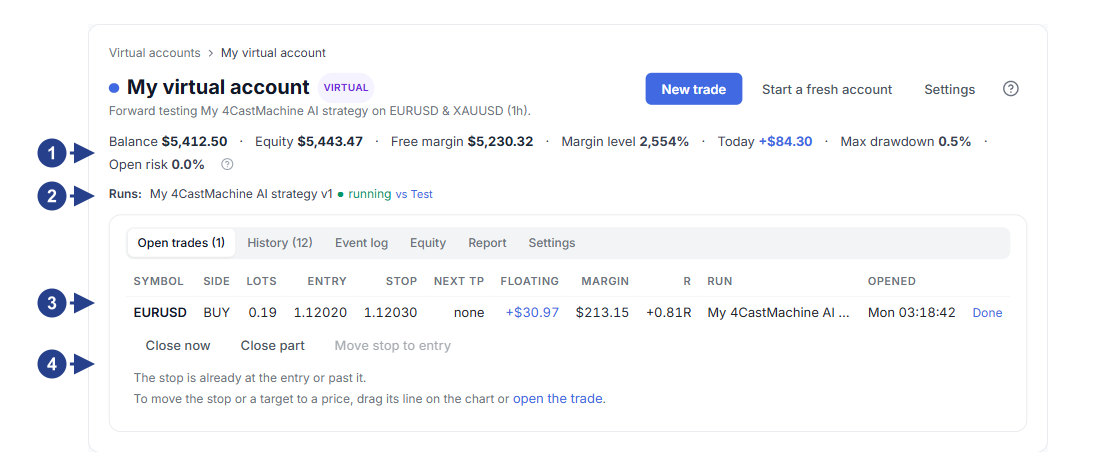
Live account summary row: balance, equity, free margin, today's result, maximum drawdown and trading days.
The Strategies on this account row for viewing connected strategies, pausing them, or adding a strategy (+ Add strategy).
The Open trades table for tracking open positions and the Manage menu for managing each trade manually.
The What if you didn't touch it? comparison section and the Closed trades history table.
Guides in this collection
Create virtual accounts, set cost profiles and risk limits: create a new account, pick a cost profile, set a daily loss limit, and compare accounts in the Strategies × accounts table.
Manual paper trading, chart management and shadow trades: place manual orders, manage open trades, and compare your manual interventions against untampered strategy execution.
Prop challenges, competitions and SHA-256 verified pages: join challenges and competitions, turn on the public account page, and verify the hash chain with Check the log.
Run your strategy live on a virtual account: connect a strategy from AI Strategy Studio to a virtual account and manage run modes.