
What you will build
Create an alert that notices when a completed candle's volume rises above a multiple of its own average. In this example the threshold is two times the twenty-bar average on one-hour candles.
Choose a symbol whose feed carries usable volume. What volume means differs between instruments and sources, and a missing volume series cannot be replaced by price ticks.
Create the condition
Open the symbol in 4CM-AI Charts.
Open Alerts and press +.
Choose Volume as the source. The row completes itself: volume has one condition, is above average.
Set the average period to 20.
Set the multiplier after the × to 2.
Set the row timeframe to 1h.
On Options, choose Once per bar close and set the Confirmation timeframe to 1h.
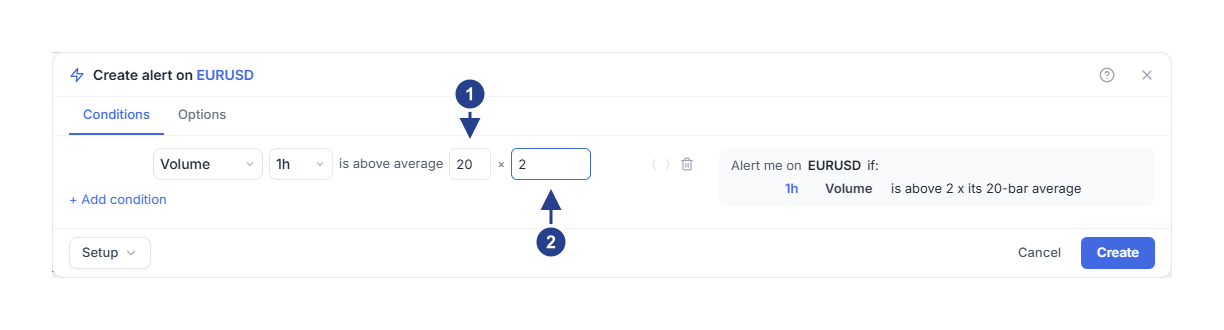
Average period: how many bars the average covers.
Multiplier: how far above that average the bar must be.
Read the row as "volume is above 2 times its twenty-bar average on one-hour candles". It compares the symbol with its own recent history. It is not a comparison with another exchange, another symbol, or your own order size.
Finish the alert
Open Message on the Options tab if you want your own words, for example "Look at the one-hour volume increase."
Set Expiration if the alert is only for one session.
Check the destinations under Notifications.
Press Create, then confirm the new row in Alerts shows Active.
If the average is around 1,000 units, a multiplier of 2 means a threshold of about 2,000 units. The average moves with the candle history: you set the period and the multiple, never the threshold itself.
The average period accepts 2 to 200 bars. The multiplier must be positive and no greater than 100.
Use volume as confirmation
Suppose you only want to look at an average crossing when volume is elevated as well.
Open the alert for editing, or start a new one.
Press + Add condition.
Set the new row to EMA, period 20, crosses above, and in its Details (the gear) compare with the SMA 50.
Set that row to the same timeframe as the volume row.
Leave the join on and.
Read the summary and save.
Now both rows have to hold at the same moment. Adding a row never creates a second alert that fires on its own. Choose or only when either row should be enough by itself.
Volume is a state, so it is a good filter: it stays true while the bar is heavy, which lets the event in the other row decide the moment.
What to check when nothing fires
Start with the symbol's volume data and the row's timeframe. A large-looking candle does not always carry high volume. Compare the real volume with the period and multiple you chose.
Volume comes from completed candle data, and for some symbols it arrives later than live prices. Keeping a chart open does not make a delayed value fresh.
Then check that the alert is active, has not expired and is inside its schedule. Volume that stays above the threshold for several candles does not necessarily produce repeated events: read timeframes, events and repeats.
After a trigger, use Log to see the recorded time and symbol, and Edit to adjust the period or the multiple.