
You will build one alert that combines several 4CM-AI rows, and then add an ordinary technical row to it. Start small, read the summary as a sentence, and add more only when each row has a clear job.
Availability
4CM-AI rows are included with every active membership, the trial as well, on symbols that have a 4CastMachine AI forecast and on the markets your plan includes. An alert that also carries technical rows follows the same rule, plus the usual limits for alerts with more than one condition.
Example: 4h context with a 1h zone visit
You want a notification when the 4h forecast is bullish and price makes a new visit to the 1h Buy zone. The two can happen in either order, but the 4h forecast has to be bullish when the alert completes.
Open Alerts, press +, and choose 4CM-AI as the first row's source.
Set its timeframe to 1h and its rule to price enters Buy zone. Add the pending event first.
Press + Add condition and choose 4CM-AI again.
Set the second row to 4h and turns bullish. With a pending event already in the alert, a direction that is already current can be used as a filter.
Leave the join on and and read the summary. Both rows must appear in it.
Suppose price enters the 1h zone at 10:05 while the 4h forecast is not bullish. That visit is kept as evidence for this cycle. If 4h becomes bullish at 10:20, the alert can complete once its timing and data requirements are met. If 4h was bullish first, a later qualifying visit completes it instead.
There is no "then" and no ordering window. and does not mean the first row has to happen first.
Events and states behave differently
new direction or pivot and the zone rules are events. Inside a forecast alert they are kept as evidence for the current cycle, even after price has left the zone.
turns bullish, turns bearish and is range bound are states, checked when the result is ready. If the 4h forecast stops being bullish before the alert completes, the earlier bullish reading does not count.
For a repeating direction-only rule, the whole direction expression has to become false before it can become true again. Pausing and resuming, editing the conditions, or coming back from a muted group or a closed schedule all start a fresh cycle.
Alternatives with or
To watch for either a 1h change or a 4h change, give both rows new direction or pivot and set the join to or. One qualifying row then completes the forecast part.
A timeframe may carry one direction row and one zone row. To ask for either of them, keep the two rows next to each other, hover the direction row and press ( ) to put them in parentheses, then set the zone row's join to or. Leave it on and when both are required.
Apart from such a pair, all 4CM-AI rows share one join: a mix of and and or between them is refused with "Put all 4CM-AI conditions in one group with one and/or between them". Keep 4CM-AI rows out of parentheses that hold technical rows as well. Each refusal says exactly what to move, because the engine cannot express those shapes.
Add a technical filter
Press + Add condition again.
Choose a technical source, for example RSI period 14, is above 50, on the timeframe you want.
Leave that row's join on and.
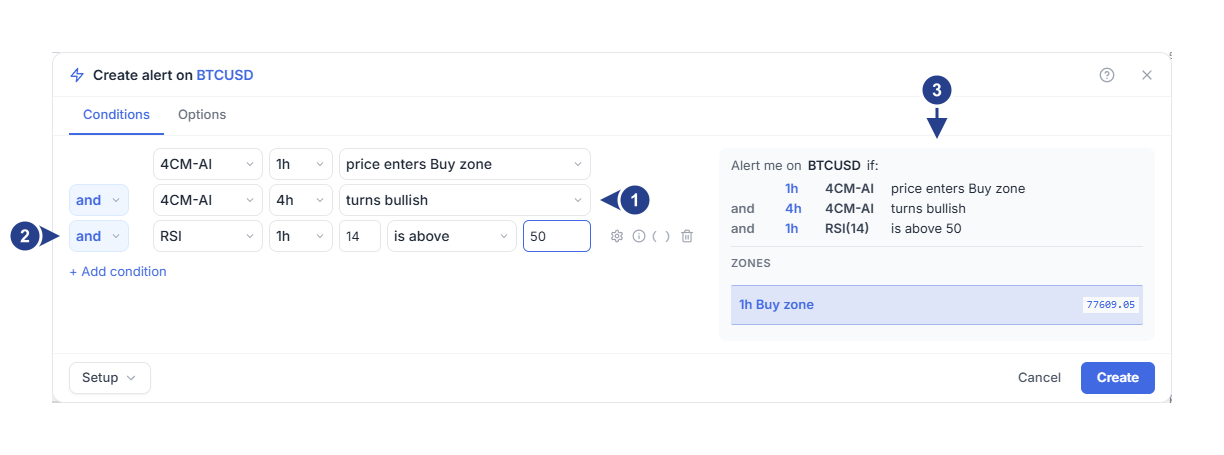
The higher timeframe sets the context.
A technical row joins the same alert with and.
The summary lists every row in order, so the whole rule is readable.
The saved rule is the forecast part and the technical part joined by and. Inside the technical part you can still use parentheses and the other joins; that does not change how it meets the forecast rows.
A line row works here too. Pick a line on the same symbol and read its description: a machine-drawn line is a fixed version and does not follow a later replacement. Moving a manual line updates the condition; deleting it pauses the alert.
If a forecast alert's technical part becomes unreadable to the engine, the alert is marked with an error instead of staying quiet for ever. Open it, fix the row and save.
Save and read the result
Choose the trigger, the expiration, the message and the destinations on Options, then press Create. Read any message about fresh data or an already-true condition before you do.
When the alert triggers, open Log and the explanation of why it fired. Original evidence keeps the event times apart from the completion time. The result describes one completed rule, so there is no single execution price.
With AI Trading Journal access, Save observation keeps the evidence for later review. Continue with reviewing the log.