
Two different settings
Every condition row except a line row carries a timeframe. It decides which candles the indicator, the pattern, the measured move or the price comparison is calculated on, and those calculations use completed candles.
The Options tab carries a second one, Confirmation timeframe. It is the alert's own bar: the one a bar-close trigger waits for, the one Once per bar counts on, and the one a candle closes inside Buy zone condition uses. It does not rewrite the timeframe of any row.
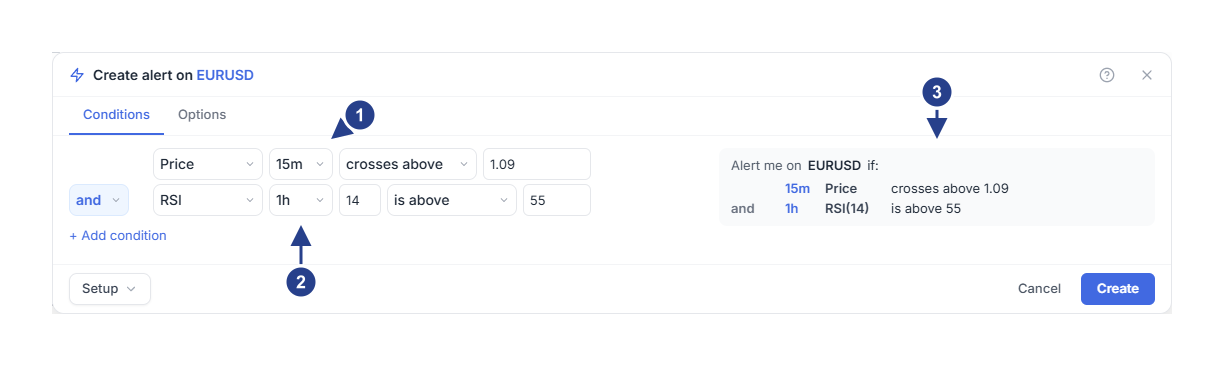
The crossing is watched on 15m candles.
The filter reads the 1h candles at the same moment.
The summary reads both rows back with their own timeframes, 15m and 1h.
A line row is the exception: it has no timeframe on its main line, because a line event happens the moment price reaches the line rather than at a bar close. Its Details, behind the gear, offers a timeframe only where it changes something, as the ATR buffer's measurement or the close that confirms a break.
For a first alert, give the row and the Confirmation timeframe the same value. Use different ones on purpose, when you want a higher-timeframe filter or a slower confirmation.
Example: fifteen minutes with an hourly filter
Consider this alert:
Row 1: Price crosses above 1.09 on 15m.
Row 2: RSI 14 is above 55 on 1h, joined with and.
Trigger Once per bar close, Confirmation timeframe 15m.
The RSI value changes when an hourly candle completes. The crossing is checked on fifteen-minute candles. Looking at a five-minute chart changes neither. If your chart comparison looks wrong, open Edit and compare the row timeframes, the indicator settings and the chosen plot with the chart.
Choose the trigger
Once only stops after the first qualifying trigger.
Once per bar allows at most one trigger inside each bar of the confirmation timeframe. Pick the bar you actually think in: if you choose 1h there, the alert can fire once an hour even when a row is measured on one-minute candles.
Once per bar close waits for the completed bar. It is the default for a price alert.
Once per minute keeps at least a minute between triggers.
A frequency setting never invents an event. A price crossing alert is not a reminder every minute because price stayed above the level. Break and bounce line conditions still wait for completed candles, and indicator and pattern rows still read completed candles.
A state is not an event
is above means the value is on the upper side right now, and it stays true as a filter. crosses above is the change from one side to the other, and a completed candlestick pattern is the same kind of thing: a moment.
An alert fires when the whole rule changes from false to true. If RSI rises above 50 and stays there for six candles, that is one continuing state, not six events. Choosing a repeating trigger does not produce an alert per candle.
Before the rule can fire again it normally has to become false and then qualify again. That is rearming.
Creating and resuming do not replay history
Monitoring starts by taking a baseline. A condition that was already true before you pressed Create is not a new event because you pressed it.
The same holds when you resume a paused alert: it waits for a new qualifying change. For a crossing, price or the indicator has to move through the level again. For a line touch, price has to leave the area around the line before a fresh visit counts.
Schedule, expiry and data also matter
A perfectly valid condition can still be outside the alert's schedule, inside a muted group or past its expiration. Those settings are separate from the row timeframe.
A calculation also needs fresh data and enough history. Volume can arrive later than live prices. Absence of an event is not proof that the market never visited an area inside an unfinished candle.
Use Alerts to check status and Log to read recorded events. For 4CM-AI conditions, follow the forecast guides: those alerts keep evidence per cycle, and current forecast directions are rechecked when the whole rule completes.