
Choose the question you want to ask
A level alert asks whether price crosses one number. A movement alert asks how far price has travelled over several candles. A range alert asks whether price is inside or outside two numbers you choose.
All three use the Price source in the alert editor, and all three read completed candles. A move during an unfinished candle does not qualify on a bar-close trigger.
Example 1: a measured move
Suppose you want to review EURUSD after its close has risen by at least 0.5% compared with three candles earlier. These settings are an illustration, not a suggested position.
Open the EURUSD chart, open Alerts and press +.
Choose Price as the source and set the row timeframe to 1h.
Choose moves up by. The amount sits at the end of the first line, and the row grows a second line for its unit and the number of bars.
Enter 0.5 as the amount and keep % as its unit.
Enter 3 in the bars box.
On Options, choose Once per bar close and set the Confirmation timeframe to 1h.
Review the message and the notifications, then press Create.
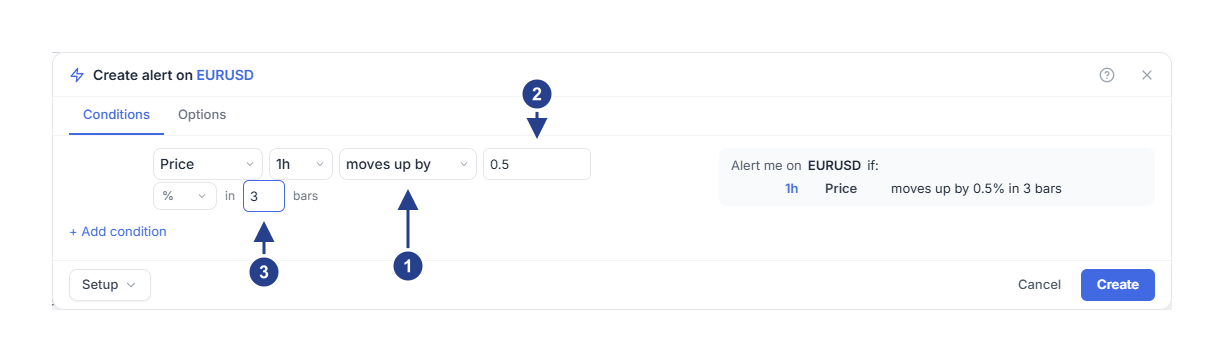
moves up by: a measured move rather than a level.
Amount: how far price must travel.
Bars: the window the move must happen inside, counted on the row timeframe.
The condition compares the latest completed close with the close that many bars earlier. Three one-hour bars means a lookback of about three hours of candles. It does not measure the distance from the highest or lowest price inside that window.
Choose moves down by for a fall. Choose pts instead of % for a change measured in the instrument's own price units: an amount of 10 then means ten price units, not ten percent and not a profit.
The amount must be positive. The lookback accepts 1 to 500 bars, and the alert needs enough history on that timeframe to make the comparison.
Example 2: price entering a range
Suppose your EURUSD chart has a review area between 1.0850 and 1.0950. The numbers are illustrative.
Start another alert on EURUSD and choose Price.
Set the row timeframe to 1h.
Choose enters. The second line asks for the two boundaries.
Enter 1.0850 as the lower bound and 1.0950 as the upper bound.
On Options, choose Once per bar close.
Read the summary and press Create.
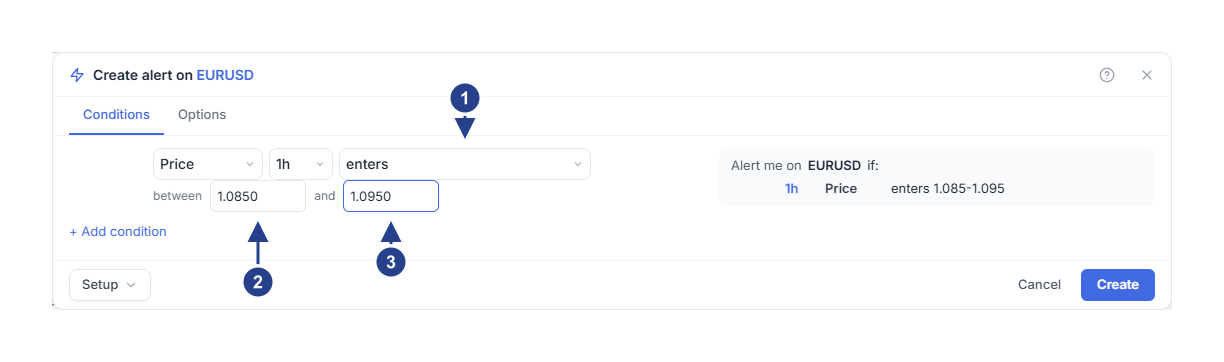
enters: the moment price crosses into the range.
Lower bound: the bottom of the range.
Upper bound: the top of the range.
Entry means a completed close that moved from outside the range to inside it. A wick that reaches into the range while the candle closes outside does not count in this example.
The lower bound must be smaller than the upper bound. The range uses the fixed numbers you type. It does not follow Bollinger Bands, and it does not follow a 4CM-AI Buy or Sell zone.
Pick the range behaviour you need
enters is the moment price moves from outside to inside.
exits is the moment price moves from inside to outside.
is inside stays true for as long as the completed close is within the range.
is outside stays true for as long as it is beyond the range.
The two standing conditions are filters: they are useful beside another row rather than on their own. A measured move that stays true does not produce a new event on every candle either. Read timeframes, events and repeats for how an alert rearms.
Check the result
Find the saved alert in Alerts and use Edit to confirm the amount, the bounds and the timeframe. After it fires, open Log. If nothing happened, check in this order: did the required change actually occur on a completed candle, is there enough history on that timeframe, and is the alert active and inside its schedule.