
Checking closed trades one by one to find trading mistakes takes time, so AI Strategy Studio and AI Trading Journal do it automatically in seconds. After any trade linked to your strategy closes (under Your trades for a live account or under Virtual accounts in the Performance tab), the Strategy check card in AI Trading Journal compares the trade against all six parts of your strategy so you can clearly see what result you got and what result you would have gotten if you had followed the strategy without manual intervention, and the Cost per strategy part card shows in dollars what skipping each part cost you.
Example: you click a closed EURUSD trade to open its Strategy check card in AI Trading Journal, click Justify to record a valid reason for one part, and review the cost per strategy part table on the Journal reports page.
Read the Strategy check card on a closed trade
Open any closed trade in AI Trading Journal and go to the Strategy check card.
Check the result badge next to each of the six strategy parts: Side (trade direction), Entry (entry condition), Stop Loss, Take Profit, Management (trade management) and Limits (risk cap). Each part receives a status of Followed, Not followed, cannot tell or not applicable.
On any row marked not followed, click Justify (or Doesn't apply?) to record a valid exception (such as closing ahead of major news) so that part does not lower your discipline score.
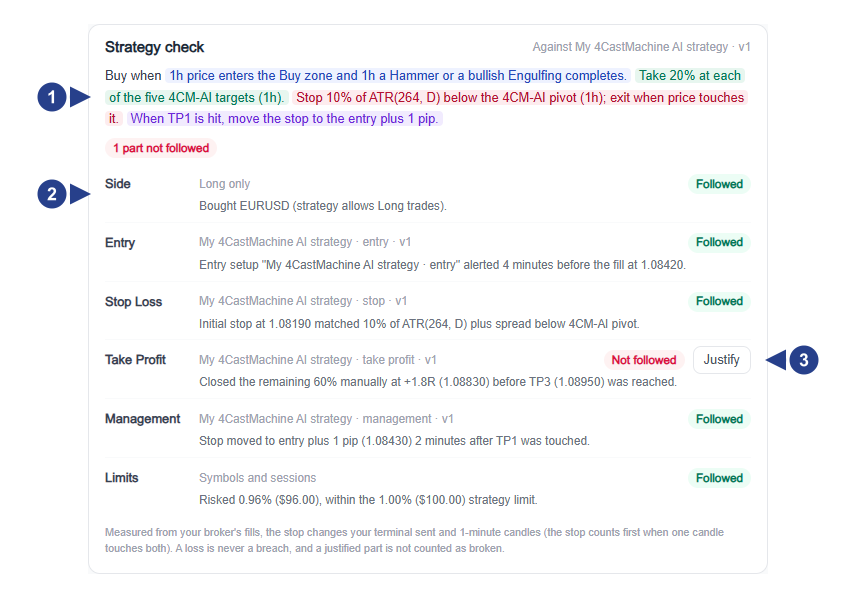
Strategy name and version, four-part colored sentence and overall adherence status.
List of the six strategy parts (Side, Entry, Stop Loss, Take Profit, Management and Limits) with each part's status badge.
The Justify button for recording a valid exception on unfollowed parts.
Read Cost per strategy part in reports
In AI Trading Journal, open the Journal reports page (or open the Report tab on a virtual account page).
On the Cost per strategy part card, compare trades that followed each part of your strategy against trades that broke it to see the win-rate change and the dollar cost of skipping each rule.
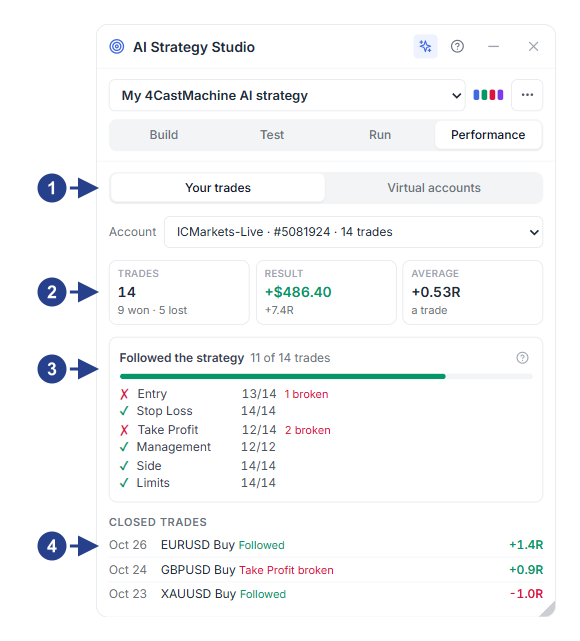
Switch between Your trades and Virtual accounts and the trading account selector.
Performance summary cards: trade count (Trades), net result (Result) and average trade.
The Followed the strategy card and the adherence breakdown across all six strategy parts.
The Closed trades list with a link to each trade's check card in the journal.