
The main reason many trades lose money is trading without a strong strategy. Without a strong strategy and confidence in its edge, you hesitate at your stop loss or move your target out of fear or greed. In AI Strategy Studio, alongside 4CastMachine AI forecasts and AI Trading Assistant, those emotional decisions disappear. Your rules turn into a clear trading plan on the chart in seconds (before you risk a single dollar).
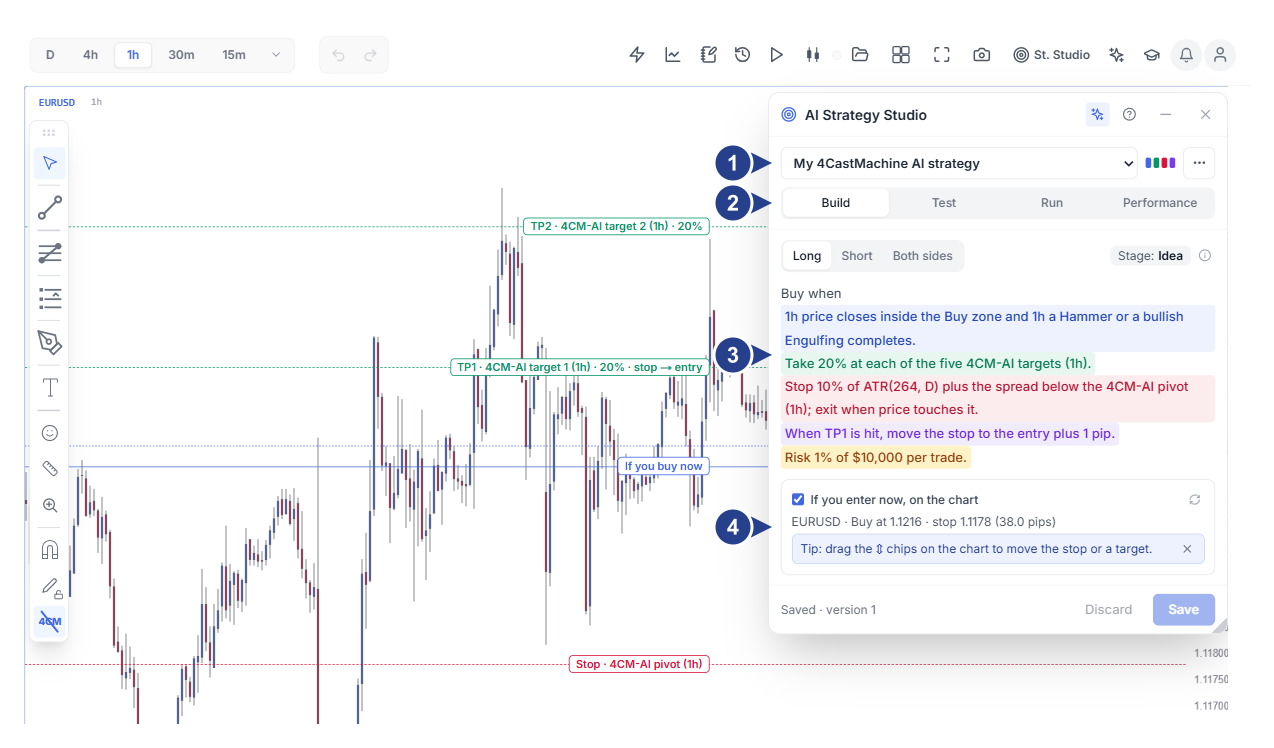
Strategy picker, colored strategy mark, ⋯ menu and ✦ AI assistant button
Four main strategy tabs: Build, Test, Run and Performance
Trade side buttons, stage badge and four-part colored strategy sentence
If you enter now, on the chart section and adjustable chart lines with ⇕ handles
Start from your trading style or 4CastMachine AI
When you click St. Studio in the top toolbar and click New, a three-step flow helps you build a complete strategy in seconds:
Choose from four standard trading styles: build your strategy from Scalping, Day trading, Swing trading or Position trading. You can also start from the ready-made 4CastMachine AI strategy template (built around 4CastMachine AI entry zones, pivots and targets).
Ten-question Find your style quiz and Academy lessons: if you do not know your trading style yet or your past strategies have not been profitable, click Not sure? Answer 10 quick questions. The studio recommends the best style for your time and risk tolerance, or you can read Your Personal Strategy and Choose Your Trading Style in the Academy.
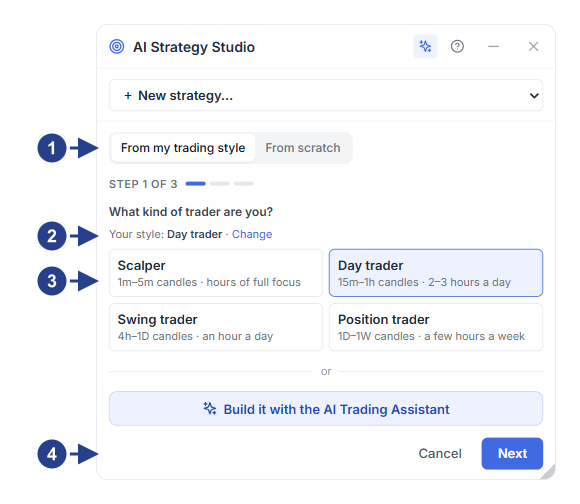
From my trading style or From scratch switch (step 1 of 3)
Saved trading style and Change link (or the 10-question Find your style quiz)
Four trading style cards with candle timeframes and holding times
✦ Build it with the AI Trading Assistant button and Next button
Know your whole trading plan before you enter
Your entry, take profit, stop loss, trade management and risk appear in one readable sentence on the Build tab. Click any part to open its focused setup panel. Entry, stop loss, price targets (TP1 to TP5) and management rules (such as break-even and early exit on trend break) appear on the chart. You can adjust any line with your mouse.
Each strategy combines four independent setups that you can save separately and reuse across multiple strategies:
Entry setup (blue, Entry): defines when to enter (buy, sell or both sides with automatic mirror rules). Start from 4CM-AI forecast zones with a confirmation candle, level breakouts or indicators.
Take profit setup (green, Take Profit): sets one to five price targets (
TP1toTP5). Place targets on 4CM-AI forecast targets, anRmultiple or price distance, and choose how much to close at each target.Stop loss setup (red, Stop Loss): sets the exit level in a loss from the 4CM-AI pivot, recent swing high/low or an
ATRmultiple. You can also add an early exit when the trend breaks.Management setup (purple, Management) and risk per trade: moves your stop to break-even automatically and trails price. It also calculates your lot size from your risk percentage per trade.
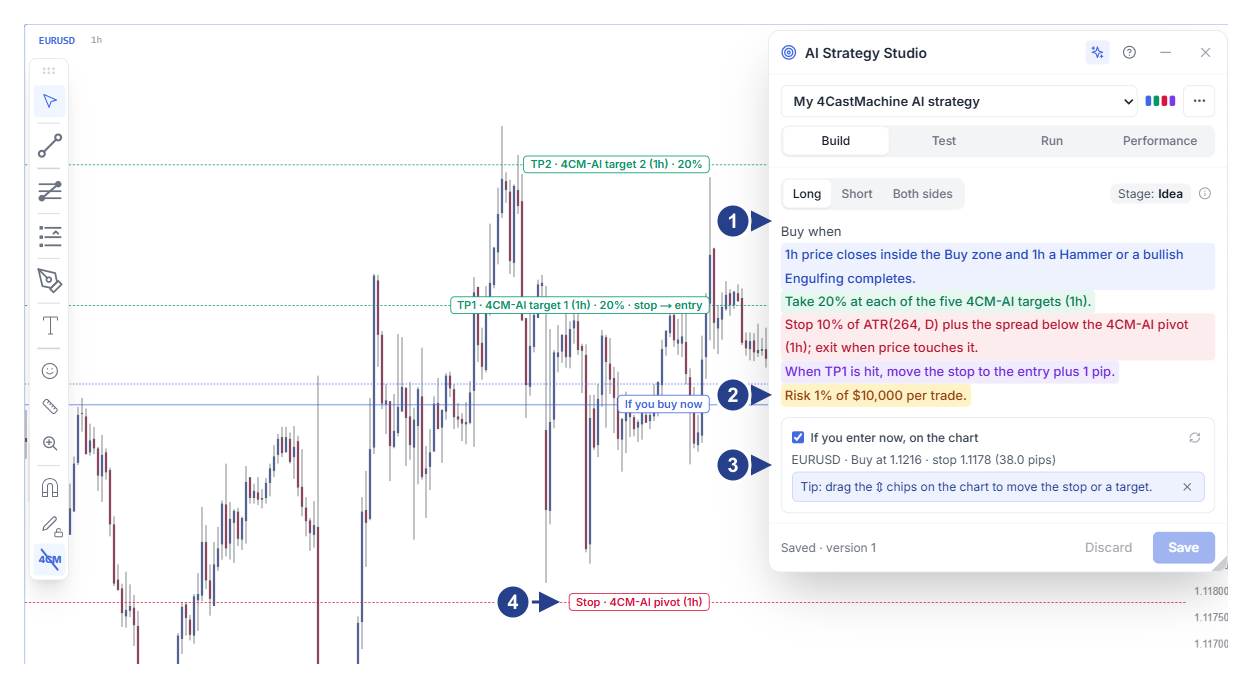
Trade side buttons, stage badge and colored strategy sentence
Risk per trade row (Risk … per trade) for automatic lot size calculation
If you enter now, on the chart section with live entry, stop loss and target prices
⇕ handles on the chart lines to move and adjust levels with your mouse
Tell the AI your strategy and let it build it for you
Click the ✦ (Ask the AI Trading Assistant) button in AI Strategy Studio to open AI Trading Assistant right beside the studio. Use the ready-made From AI Strategy Studio starters or tell the AI your strategy in your own voice (or in a short sentence). The AI builds the complete strategy, setups and risk rules on the chart.
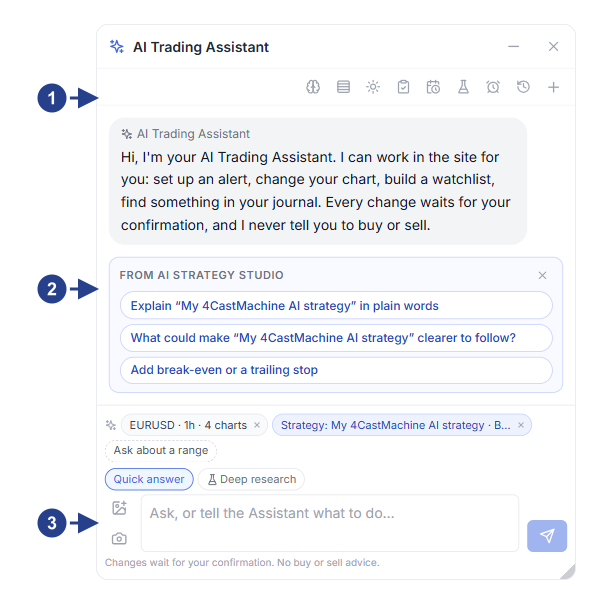
Active strategy and studio tab indicator at the top of the assistant window
Ready-made From AI Strategy Studio prompts (step-by-step build, 4CM-AI template, test and virtual run)
Chat box to ask the AI to build or edit any strategy rule
Prove your strategy before risking real money
Running a new idea straight on a real account puts your capital at risk right away. On the Test tab, test your strategy rules on past candles with a starting balance and realistic costs without risking a dollar. Review the balance curve, win rate and how trades ended, then use candle-by-candle Replay to spot weaknesses in minutes instead of weeks. (The Test tab will be released to everyone in the near future.)
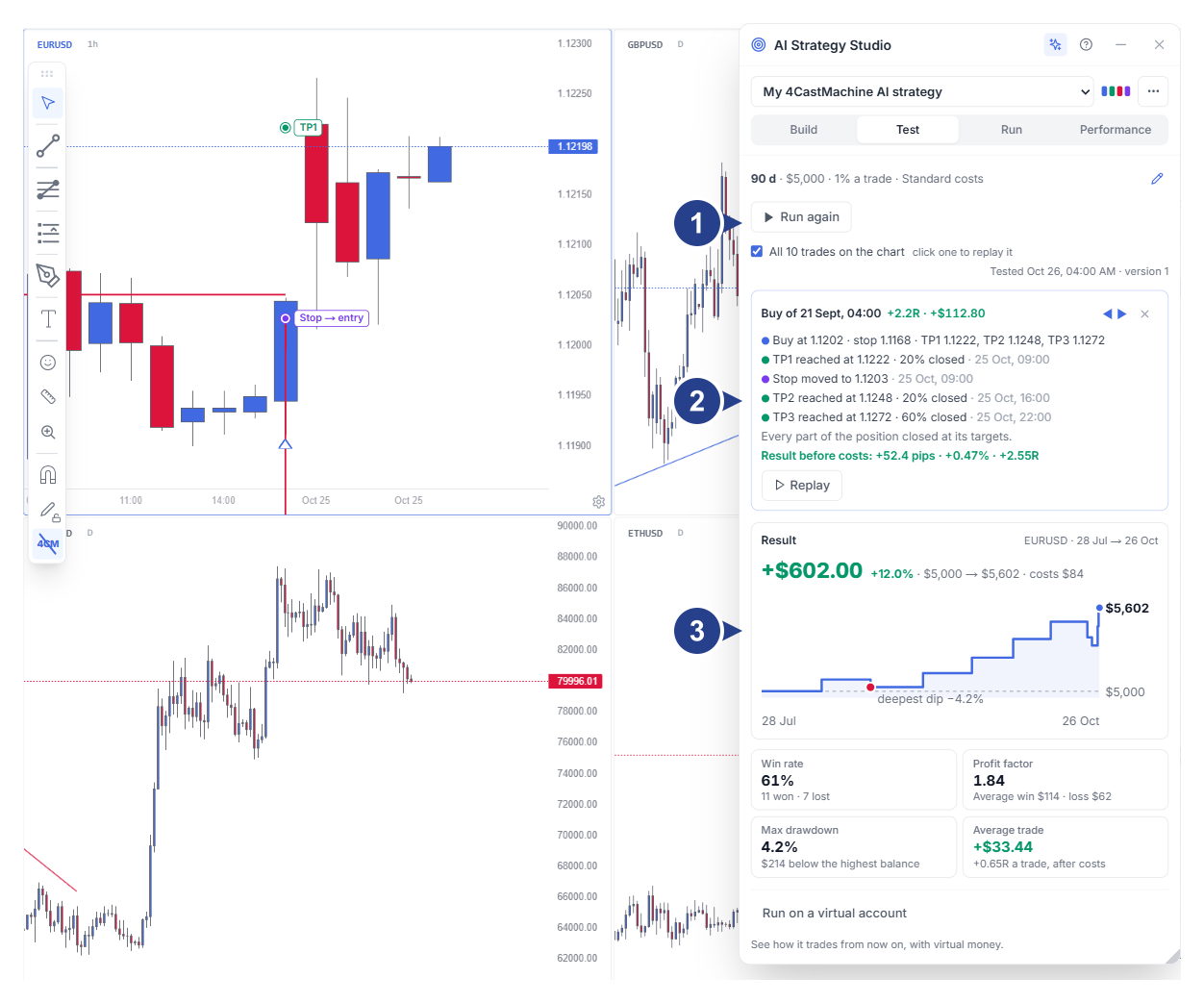
Time range picker, Money settings summary and All N trades on the chart checkbox
Step-by-step trade review card with the Replay button
Result card with net profit, balance curve, key metrics and Run on a virtual account button
Run on virtual or real accounts
On the Run tab, run and follow your strategy in the live market in two ways so you do not have to watch charts all day:
Automated forward test on a virtual account (Virtual account): run your strategy in the live market with virtual money. Trades open, manage and close with real spread, commission and swap costs, and Compare with a variant compares parallel versions side by side.
Watch symbols and follow open trades on a real account (Real account): watch your chosen symbols and timeframes on this tab and set the Tell me when notification grid. When your entry lines up, the full trading plan appears under Latest alerts, and step-by-step break-even and stop-trail reminders stay with you under Open trades.
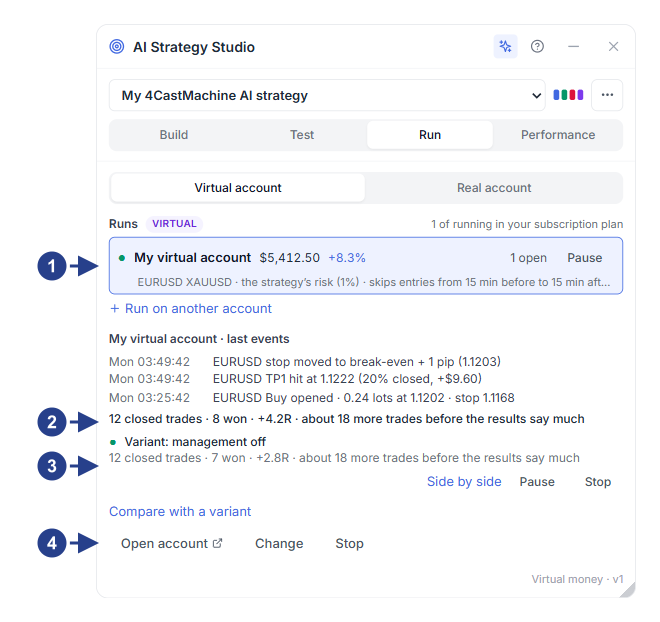
Virtual account switch and active runs list with Pause / Resume button
Trade performance summary and latest forward-test trade activity
Compare with a variant section for running parallel shadow variants
Open account, Change and Stop buttons for the selected run
Measure real vs untampered results in Performance and Journal
Often the strategy itself is profitable, but last-second changes such as closing winners early, moving the stop loss or entering outside the rules cause losses. The Performance tab connects directly to AI Trading Journal and measures your results in two views:
Your real account trades (Your trades): every closed trade is checked against all strategy parts on the Strategy check card. You see clearly what result you achieved vs. what result you would have achieved if you had followed the strategy without tampering, and what each rule break cost in dollars.
Virtual accounts (Virtual accounts): track live virtual strategy performance and compare live results against past tests. You also see the dollar impact of manual changes compared with automated execution.
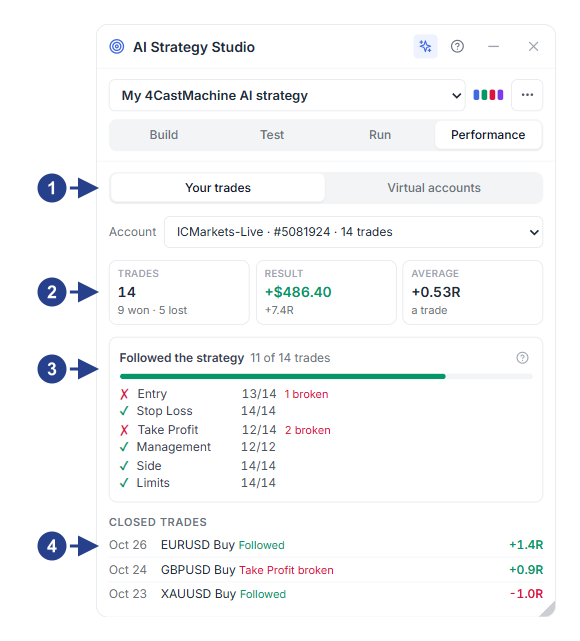
Switch between Your trades and Virtual accounts and the trading account picker
Performance summary cards: trade count (Trades), net result (Result) and average trade
Followed the strategy card and adherence breakdown across all six strategy parts
Closed trades list with links to the journal check card