
Building and managing a strategy in ForecastCity does not require filling out every window by hand. Click the ✦ (Ask the AI Trading Assistant) button at the top of AI Strategy Studio to open the AI assistant right beside the studio. Tell it your rules in plain words (by text or voice) and it builds a complete strategy in seconds, filling in any unspoken part with smart 4CastMachine AI defaults.
Example: in the AI Strategy Studio header, you click ✦ to open AI Trading Assistant beside the studio, ask it to build the default 4CastMachine AI strategy for day trading on the 1-hour EURUSD chart, and then open a $5,000 virtual account and start a live run on it.
Open assistant side by side with studio
In the top bar of AI Strategy Studio, click ✦ (Ask the AI Trading Assistant) to place the AI Trading Assistant window right beside the studio so both windows stay visible at the same time.
Above the message box, the From AI Strategy Studio section shows ready-made prompts for your active strategy. With one click, you can ask the assistant to build a new strategy, explain the current strategy in plain words, review its weak points or start running it on a virtual account.
You can also click the microphone icon and describe your entry, stop loss, take profit and risk rules by voice (or by typing in your language).
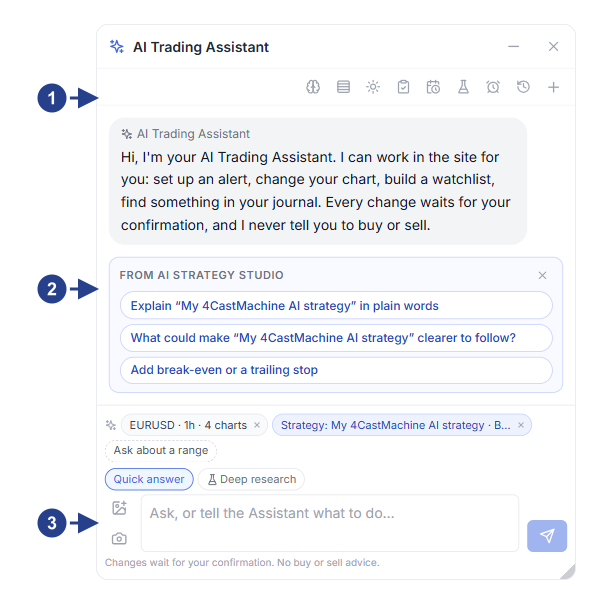
Active strategy and studio tab indicator at the top of the assistant window.
Ready-made From AI Strategy Studio prompts (step-by-step build, 4CM-AI template, test and virtual run).
Chat box for asking to build or change any strategy rule.
Ask the assistant to build a strategy
When you ask the assistant to build a strategy, any take profit, stop loss or management part you leave out of your message is automatically filled in with the default 4CastMachine AI rules on that timeframe.
Review the New strategy confirmation card shown by the assistant and click Show on chart to draw the sample entry, stop loss, targets and break-even lines on the current chart before saving.
Click Save to create the setups and the strategy, then click Open on the chart to open it directly in AI Strategy Studio.
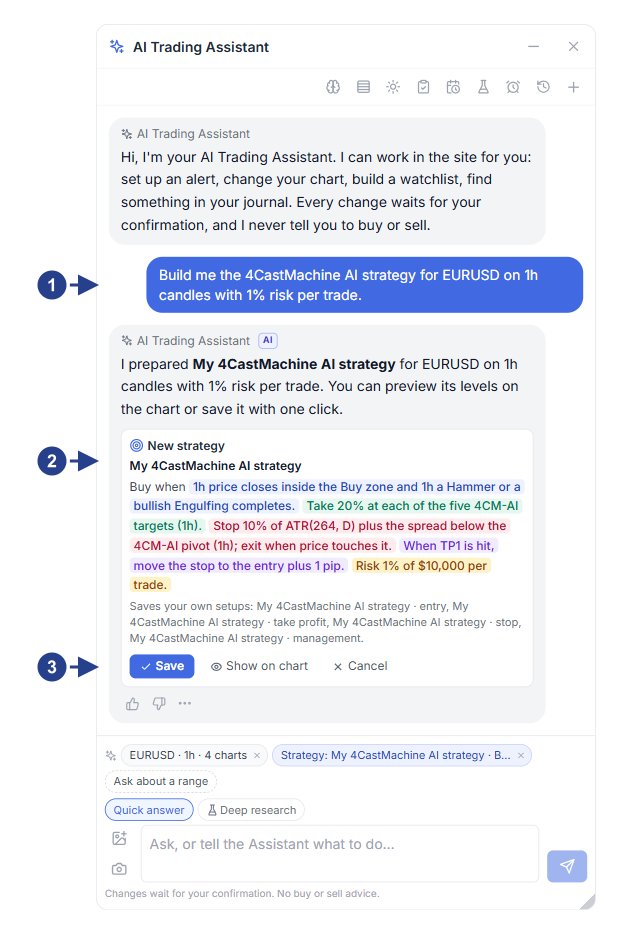
Your plain-language request or answers to the assistant's step-by-step questions.
Proposed strategy preview card (New strategy) with the four-part colored sentence.
The Show on chart, Save and Undo buttons.
Manage virtual accounts and forward test runs with the assistant
Create, edit, rename or upgrade any entry, take profit, stop loss, trade management or risk per trade setup.
Create a new virtual account with your chosen starting balance and cost model, and start, pause or stop a live strategy run on a virtual account.
Ask for the status of your virtual accounts (balance, equity, drawdown and open trades) and review the Strategy check card summary on closed trades.