
In AI Strategy Studio, artificial intelligence makes managing open trades and locking in profit simple and accurate: you simply define in the management setup how your stop loss moves automatically once price moves in your favor. You can move the stop loss to the entry price (break-even) after price hits the first target (TP1), a chosen R multiple or the WEMA 21 moving average, and then trail the stop automatically behind 4CastMachine AI pivots, an ATR multiple, a fixed distance or recent candles.
Example: you build a management setup with the default 4CM-AI settings that moves the stop loss to the entry price plus 1 pip when price reaches TP1 and trails the stop loss behind the 4CM-AI pivot after break-even.
Open the Management setup window
In the Build tab of AI Strategy Studio, click the dashed + management button or the purple Management part in the strategy sentence to open the management setup selection list (click ‹ The strategy to return to the strategy page).
Pick a saved management setup, click the pencil icon on the active row, or click + New Management setup.
Set your break-even rule
Under Break-even · optional, click + Add break-even if the row is not active.
Next to When, choose what triggers moving the stop loss to break-even:
Take Profit hits (default): when price hits one of your take profit targets (from TP1 to TP5, defaulting to TP1).
price reaches: when the trade reaches a chosen R multiple (such as
1R).profit reaches: when the trade profit reaches a chosen distance in pips, price or percentage.
price reaches WEMA 21: as soon as price in profit reaches the 21-period weighted exponential moving average (
WEMA 21) on your chosen timeframe, the stop loss moves to the entry price.
Next to Move the stop to the entry, plus, the offset defaults to
1pip to cover spread and commission costs (you can set it to0or any custom value).
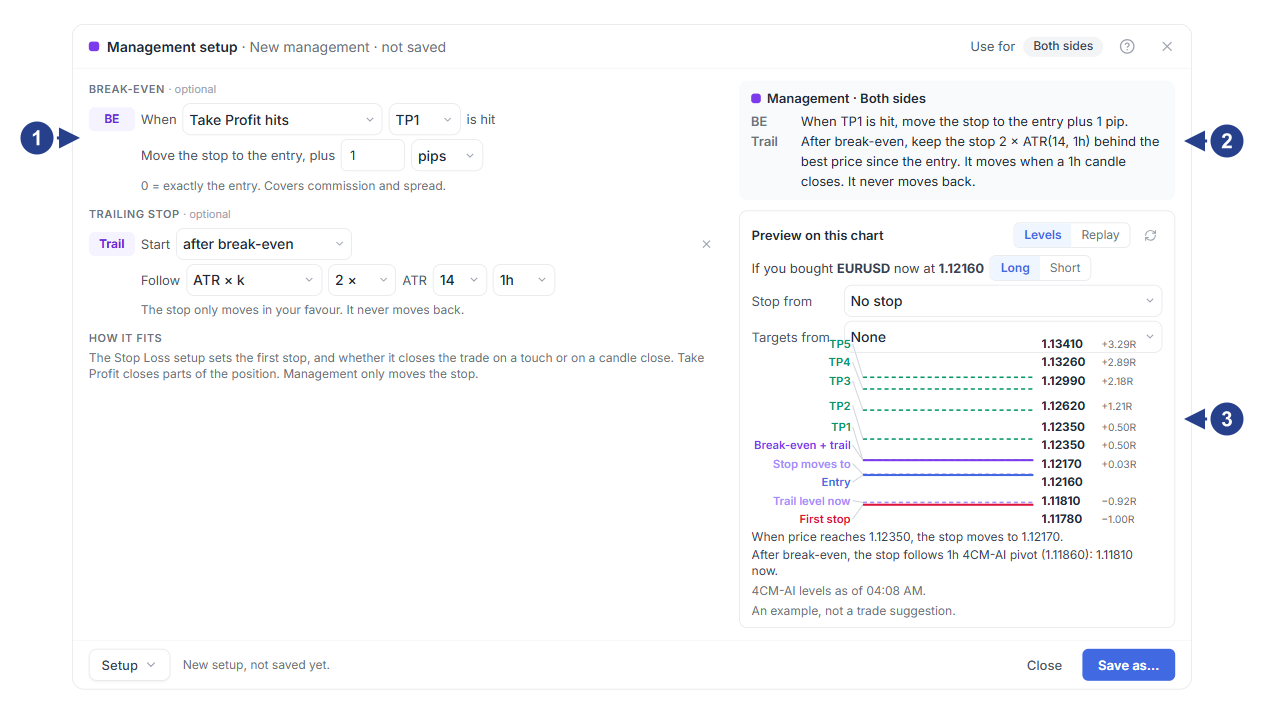
Break-even trigger when price breaks
WEMA 21with a healthy candlePlain-text summary card of the break-even rule on
WEMA 21The Replay tab to watch the stop loss move candle by candle on the chart
Add an optional trailing stop and preview
Under Trailing stop · optional, click + Add a trailing stop and choose next to Start when trailing begins (for example, after break-even).
Next to Follow, choose how the stop trails price:
4CM-AI pivot (default): follows the support or resistance pivot of the 4CastMachine AI forecast.
Distance: keeps a fixed distance in pips, price or percentage behind the best price reached.
ATR × k: trails price by a multiple of ATR or the daily range average
ATR(264, D).Recent low/high: trails behind the lowest low or highest high of the last
Ncompleted candles.
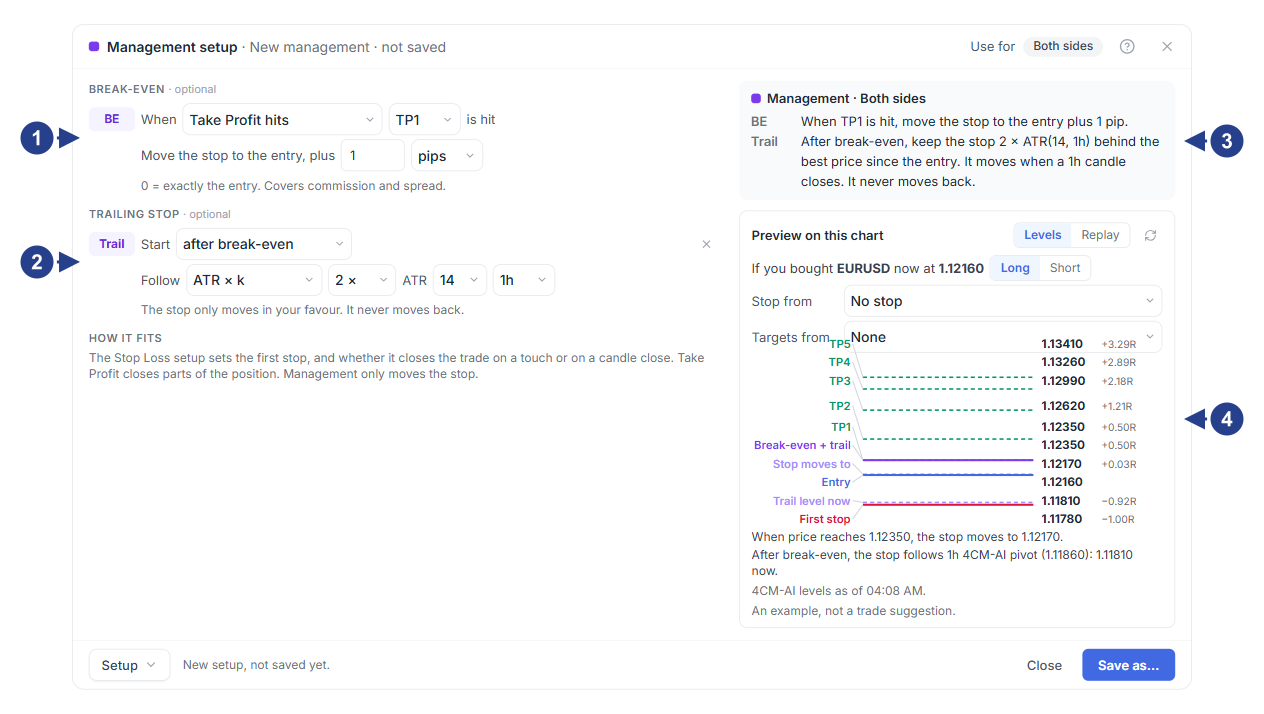
Break-even rule (Break-even): trigger condition and
+1 pipoffset from the entryTrailing stop rule (Trailing stop): starts after break-even and follows the 4CM-AI pivot
Plain-text summary card of the break-even and trailing stop rules
The Preview on this chart box with the level table (Levels) and candle replay (Replay) tabs
After you save the management setup, the purple Management rule is added to the strategy sentence and the Then row in the level table of the Build tab so you see the break-even and management level right beside the other chart lines.
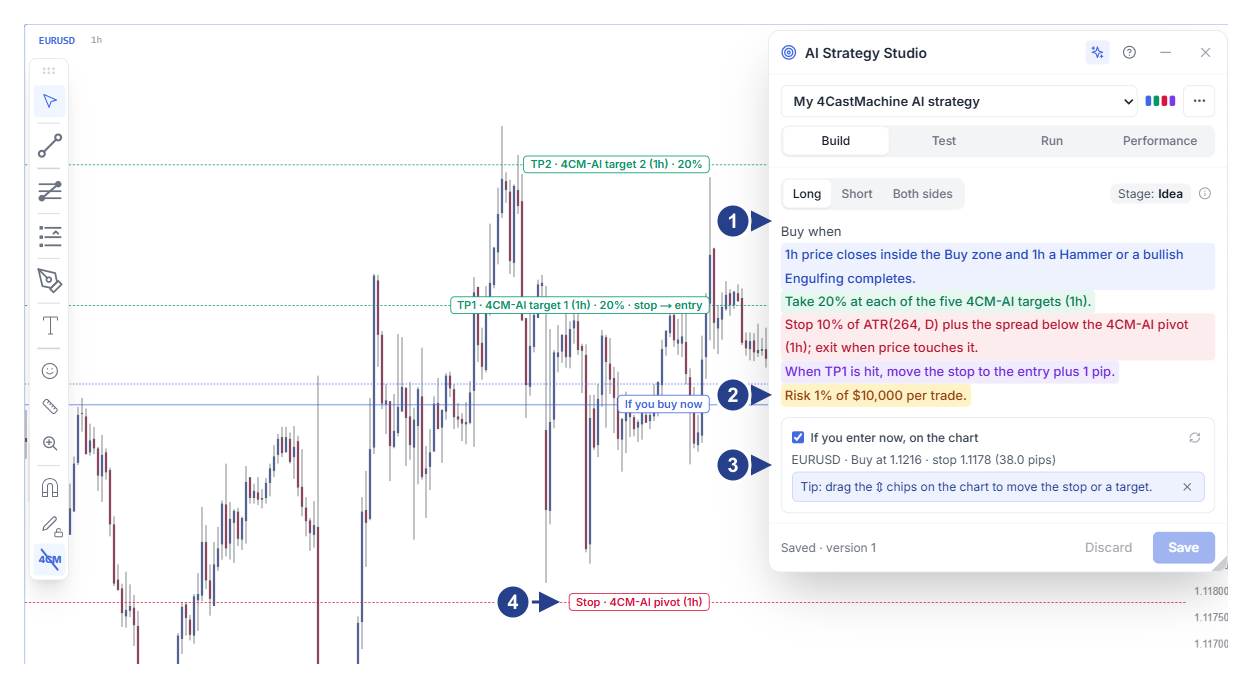
Trade direction buttons, stage badge and colored strategy sentence
Risk per trade row (Risk … per trade) for automatic lot size calculation
The If you enter now, on the chart section with live entry, stop loss and target prices
The ⇕ handles on the chart lines to move and adjust levels with the mouse
Good to know
A management setup moves your stop loss only in your favor and never pulls it backward once it has advanced.
Under Virtual account, the forward test engine applies your break-even and trailing stop rules automatically on virtual trades; you can also add a comparison variant under Compare with a variant to see how your strategy performs with and without trade management.