
The fastest and easiest way to build an accurate strategy in AI Strategy Studio is to start from your trading style so our AI builds every part of the strategy for you in seconds (if you have not chosen your trading style yet or your past strategies have not been consistently profitable, read Choose Your Trading Style and Your Personal Trading Strategy in the Academy first, or answer the 10-question Find your style quiz right in this window).
Example: you trade EURUSD on the 1h chart and want to create the default Buy 4CastMachine AI strategy so its 4CM-AI buy-zone entry with candle confirmation, 4CM-AI take profit targets, 4CM-AI pivot stop loss and break-even level are drawn directly on your chart.
Open AI Strategy Studio and the New strategy window
Open EURUSD in 4CM-AI Charts and set the chart timeframe to 1h.
Click St. Studio in the top toolbar to open AI Strategy Studio.
Click New at the top of the window to open the three-step new-strategy flow.
Step 1: Choose your trading style or answer the 10-question Find your style quiz
In Step 1 (From my trading style), pick one of the four standard trading styles: Scalping (timeframes
5m-15m), Day trading (timeframes15m-1h), Swing trading (timeframes4h-1D) or Position trading (timeframes1D-1W).If you are not sure which style fits you, click Not sure? Answer 10 quick questions to open the Find your style window. Answer 10 short questions about your daily screen time, risk tolerance and patience to see your closest trading style and a direct link to the Choose Your Trading Style lesson in the Academy.
Review the summary of the four setups (entry, stop loss, take profit and management) below the cards and click Next.
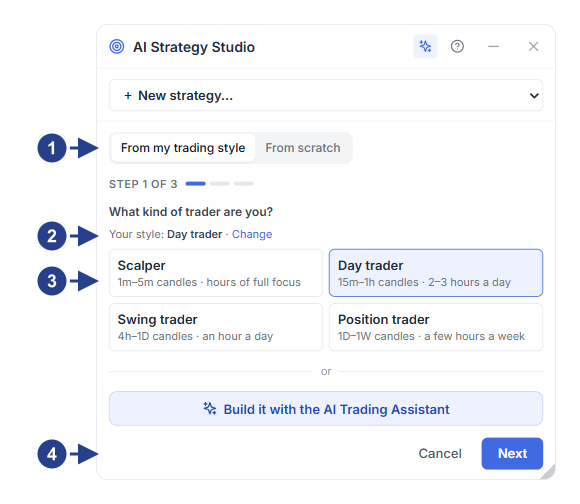
Toggle between From my trading style and From scratch (Step 1 of 3)
Your saved trading style and the Change link (or the 10-question Find your style quiz)
Four trading style cards with candle timeframes and holding time
The ✦ Build it with the AI Trading Assistant button and the Next button
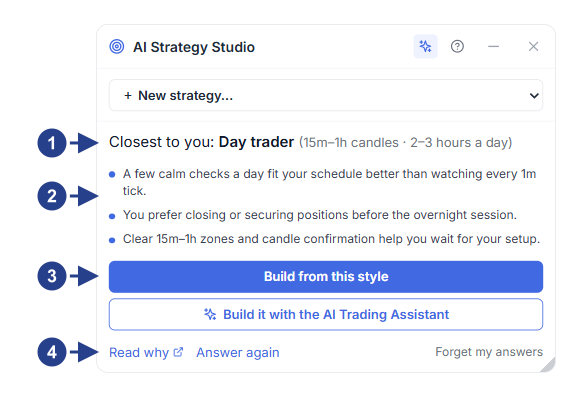
Your closest trading style result with recommended timeframes
Personal notes from your answers on screen time, temperament and risk tolerance
The Build from this style button or building with the ✦ AI Trading Assistant
Link to read the Academy lesson (Read why in the Academy), retake the quiz or clear answers
Step 2: Pick a starting template
In Step 2 (Pick a starting point), the default 4CastMachine AI strategy template (the core strategy behind 4CastMachine AI forecasts) is selected automatically with the green fits your style badge. Four other standard templates (Trend pullback, Momentum breakout, Oversold bounce and Trend follower) are also available beside it. Pick your starting template and click Next.
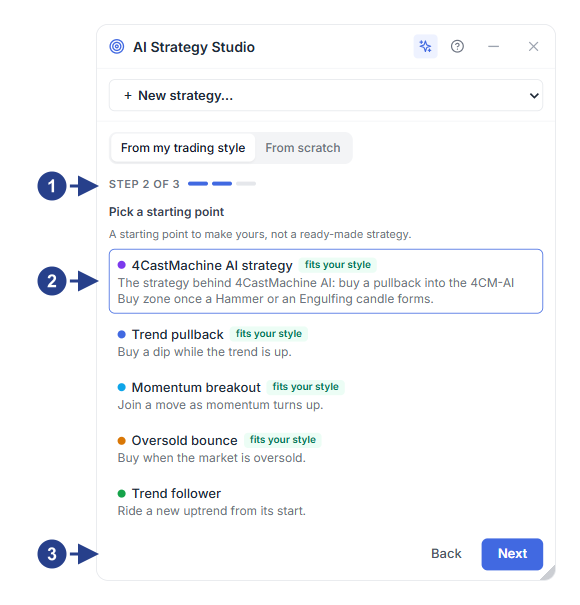
Step 2 indicator (Step 2 of 3)
The default 4CastMachine AI strategy template (alongside four other templates)
The Back and Next buttons to move to Step 3
Step 3: Choose the side, name your strategy and create it
In Step 3 (Buy or sell, and a name), pick the trade side (Buy or Sell), enter a strategy name, review the strategy sentence preview and click Create. In the default 4CastMachine AI strategy template, the entire strategy reads as one sentence in four colors:
Blue part (Entry): price enters the 4CM-AI Buy or Sell zone with a confirming Hammer, Shooting Star or Engulfing candle.
Green part (Take Profit): closes the trade in steps at the 4CM-AI forecast targets.
Red part (Stop Loss): places the stop loss behind the 4CM-AI pivot by
10%of dailyATR(264, D)plus the spread.Purple part (Management): moves the stop loss to the entry price plus
1 piponce price hits TP1 and trails the 4CM-AI pivot.
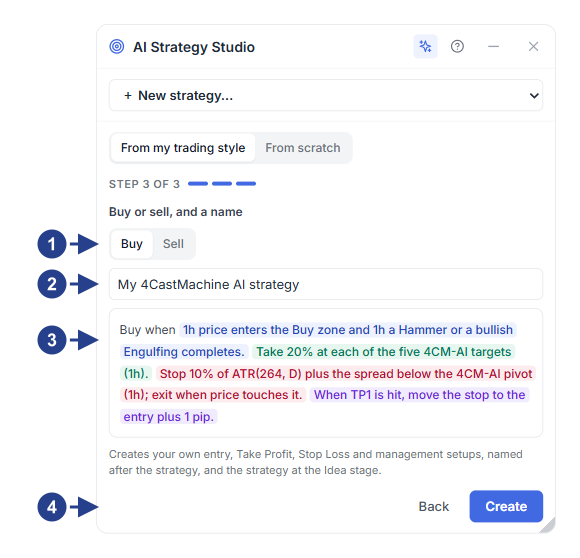
Trade side selector (Buy or Sell) for the new strategy
Strategy name box
Full colored strategy sentence preview before creation
The Create button to build the setups and open the Build tab
Check the lines on the chart in the Build tab
After you create the strategy, the Build tab opens and the If you enter now, on the chart section displays the live entry price, stop loss (and 1R distance in pips), take profit targets and break-even rule directly on the chart. Whenever the market price moves, click Price again or simply move your mouse to adjust the lines on the chart.
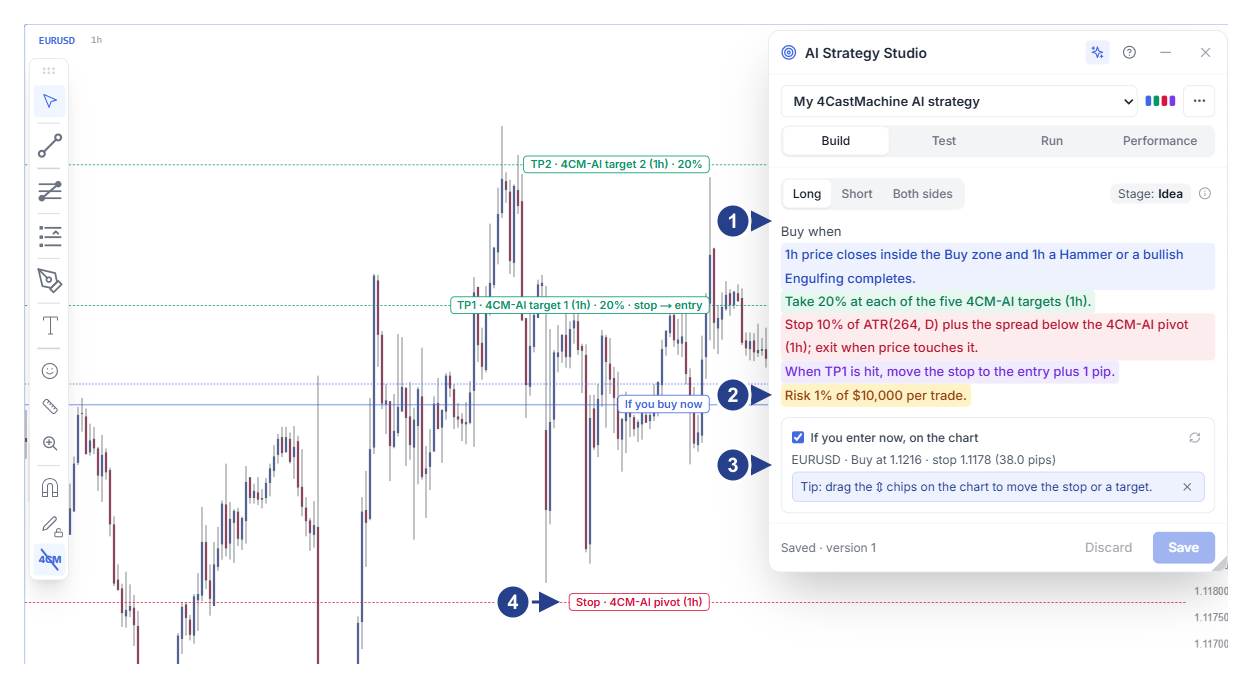
Trade side buttons, stage badge and the colored strategy sentence
Risk per trade row (Risk … per trade) for automatic lot-size calculation
The If you enter now, on the chart section with live entry, stop loss and target prices
Drag handles (⇕) on the chart lines to adjust levels with your mouse
Good to know
4CastMachine AI has two official strategies: 4CastMachine AI strategy is the intraday strategy (timeframes 5m to 4h) and Trend Hunter Strategy is the daily strategy (timeframe 1D).
No part of any template is locked; in the Build tab you can click any part to change its setup or click the ✦ AI assistant button to customize it for you.