
ForecastCity is the all-in-one AI platform for traders. It brings nine AIs together. Four of them read the market, and five work on you and your trades. Five of the nine work today, and the other four launch in the coming months.
This page shows what each AI does for you and how the nine help each other. Once you know that, you no longer have to follow every headline yourself or sit at the chart all day. Each day you know what to look at, and you make calmer decisions.
Example: at 08:00 you open EURUSD on the 4h timeframe. The forecast panel shows a bullish direction with a pivot at 1.0850. A forecast shows the most likely price path. An alert tells you when to look. The decision is yours. The prices in this guide are examples, not advice.
Four AIs that read the market
The four AIs that read the market are the Quad-AI engines. 4CastMachine AI, the forecasting engine of ForecastCity, runs on these four engines. Each engine answers one question:
| Engine | Question | What it does for you |
|---|---|---|
| Forecast AI | What is happening? | It reads the price structure: patterns, trends, and support and resistance levels. You do not have to combine dozens of indicators yourself. |
| Sentiment AI | Why? | It reads news, financial reports and social media, and it measures the market mood. You do not have to follow every headline yourself. |
| Synergy AI | How do they combine? | It weighs the technical view against the market mood, under live market conditions. Instead of two opinions that disagree, you get one summary. |
| Navigator AI | What now? | It turns that summary into the model's most likely price path and draws it on the chart: green arrows, zones and the pivot. Before every trade, you know where the pivot is. |
What these four engines produce is the forecast you see on the chart in 4CM-AI Charts.
Five AIs that work on you and your trades
The other five AIs are the AI Trading family. Instead of the market, these five work on you: your trades, your habits and your learning.
| AI | What it does for you | Launch |
|---|---|---|
| AI Trading Journal | It records your trades and shows the patterns you repeat, for example entering again right after a loss. | Live |
| AI Trading Assistant | It does everyday tasks from a request you write in plain words. | September 2026 |
| AI Trading Coach | It remembers your level, your habits and your past mistakes. Its guidance is for you, not for another trader. | October 2026 |
| AI Trading Academy | The coach teaches and asks you questions. You move to the next lesson only when your answers show you are ready. | November 2026 |
| AI Trading Community | You share your analysis with traders who follow the same charts. When nobody answers, the AI does. | December 2026 |
The launch months are our target, not a promise.
How do the nine AIs work together?
The diagram shows the nine AIs and the messages they send each other. Point at an AI, or tap it on a phone, to see what it does for you.
When all nine are live, one day in that conversation looks like this. Navigator AI finishes your forecast and sends it to your journal with a question: “was the plan followed?”. It hands the same read to your assistant as “today’s setups”.
Your journal tells your coach: “he keeps closing winners early”. The coach turns that into a lesson and tells the academy: “start him at level 4”. When you pass it, the academy tells your assistant: “he just learned bear flags”. So tomorrow’s brief already has one waiting, on a symbol you follow. And when you post a question at three in the morning, the coach answers while the room is quiet.
You never switch any of this on. It is why the same mistake stops repeating, and why you learn from your own trades instead of someone else's examples. Nine systems, one job, the one printed under our name since the beginning: be a better trader with AI.
What works today
Today five of the nine AIs are live. Here is one day with the same EURUSD example, using only the parts that work today:
08:00: The forecast is ready. The four Quad-AI engines have read the market, and Navigator AI has drawn the path on the chart.
08:05: You create an alert that notifies your phone when price enters the 4h Buy zone. Then you close the chart.
14:10: Price enters the Buy zone. The alert fires, and its notification reaches your phone.
14:15: You look at the chart and decide for yourself. If you trade, you open the trade in MetaTrader, at your own broker. ForecastFollow shows the same forecast there.
After the trade: ForecastFollow sends the trade to the AI Trading Journal automatically. The journal files it next to your earlier trades, with nothing to type.
Your part that day was to read the chart, create one alert and decide. ForecastCity watched the price and recorded the trade.
What does ForecastCity not do?
ForecastCity gives no signals. What it gives you is a forecast: the most likely price path, with zones and a pivot. The decision to buy or sell is yours.
ForecastCity does not place trades. It does not connect to a broker, and it places no orders. An alert only sends a message. You open every trade yourself, at your own broker.
ForecastCity gives no financial advice. Its forecasts do not know your capital, your time horizon or your risk. Only you know those.
ForecastCity guarantees no result. Any forecast can be wrong, and the risk of every trade is yours.
Good to know
You install nothing for the Web App. It works in your browser. If you trade in MetaTrader, you install only ForecastFollow on that same computer.
Although the Web App is not designed for mobile phones, you can still open it on one. The phone first shows a page titled “Best opened on a computer”. Continue anyway takes you into the Web App on that phone. What you see there is by no means a mobile app. We will build a dedicated mobile version in the future.
Your subscription plan decides which markets you have and how many alerts you can keep.
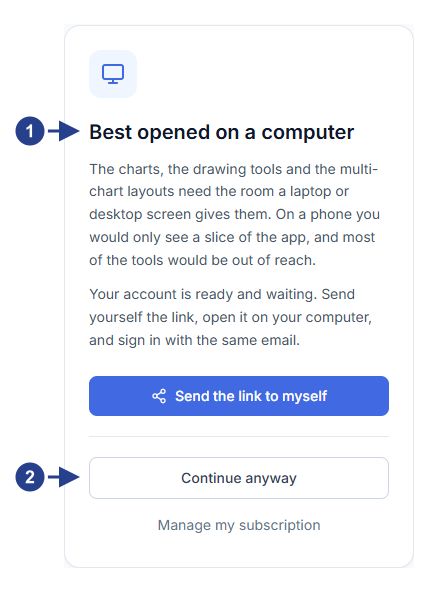
The page title: Best opened on a computer.
Continue anyway: opens the Web App on the phone.