
A virtual account in AI Trading Journal works for both manual paper trading (Paper Trading) and automated runs of strategies built in AI Strategy Studio. Most importantly, whenever you intervene manually during a strategy run (for example, closing a trade early out of fear of a reversal or moving the stop loss to entry), the system keeps a shadow trade following the strategy's original rules in the background and shows whether your manual intervention added profit or cut the strategy's gain short.
Example: your strategy enters a EURUSD buy trade at 1.0850; you click Close now at +$35 profit, while the strategy's own rules would have exited at take profit two hours later for +$95. The What if you didn't touch it? section reports that exact -$60 difference from your manual intervention.
Manual paper trading and chart management
On any virtual account, you can place manual trades on their own or alongside active strategies:
Place buy or sell orders: choose the symbol, direction (Buy or Sell), order type (Market, Limit or Stop), and stop-loss (SL) and take-profit (TP) levels.
Automatic lot-size calculation from risk percentage: instead of guessing lot size, enter your risk percentage (for example, 1% of account balance) and stop-loss distance so the exact lot size is calculated from your virtual account balance.
Manage trades on the chart: open virtual account trades appear on the chart so you can visually track and manage entry price, stop loss and take profit on live candles.
Connect strategies to a virtual account and manage Open trades
To run a strategy on a virtual account, click + Add strategy on the account detail page, or open the Run tab in AI Strategy Studio, select Run on virtual account, and click Start on virtual account.
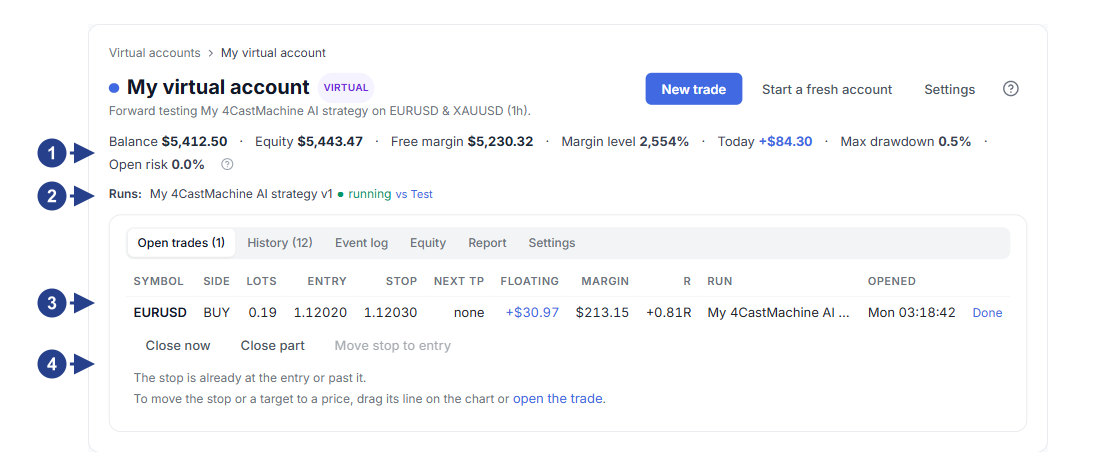
Live account status row showing balance, equity, today's profit or loss and maximum drawdown.
Row of strategies connected to the account with the + Add strategy button.
The Open trades table and the Manage menu next to each open trade (Close now and Move SL to breakeven).
The What if you didn't touch it? card comparing your actual result against the untampered strategy outcome.
In the Open trades table, click Manage next to any open trade for two quick actions:
Close now: close the trade immediately at the live market price.
Move SL to breakeven: move the stop loss to the entry price to make the trade risk-free.
Measure manual interventions in What if you didn't touch it?
Every time you use the Manage menu to intervene in a strategy trade, the system continues tracking the original strategy trade as a shadow trade until it hits take profit, stop loss or the strategy's own exit rule:
The What if you didn't touch it? card shows two numbers side by side: your actual account result (including manual interventions) and the result the strategy would have recorded without your changes.
In the Closed trades table, each manually modified trade also shows the dollar difference badge so you can see clearly where your discretion helped the strategy and where fear or greed reduced your profit.
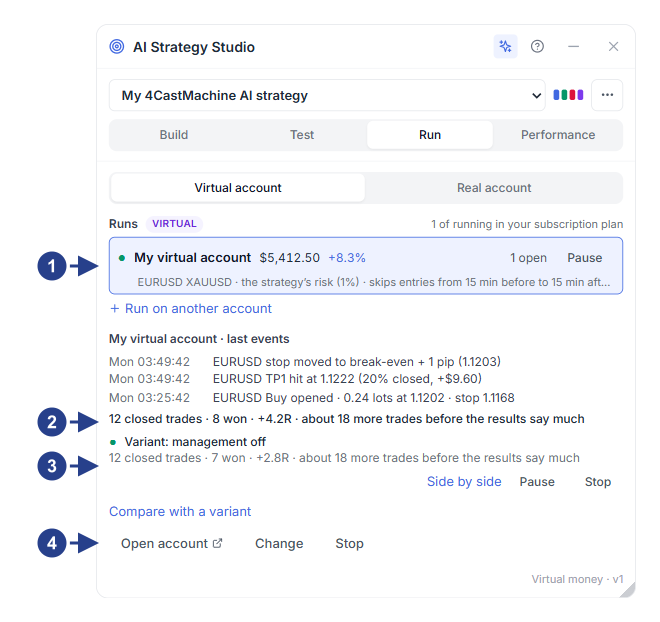
The Run tab in the AI Strategy Studio panel.
Selecting Run on virtual account for live execution on a virtual account.
Setting the target virtual account, position size and risk limits.
The Start on virtual account button for starting live strategy execution.