
You do not need to sit in front of a monitor waiting for price to reach a Buy zone or Sell zone, and you never need to work out lot sizes or target prices by hand. ForecastCity connects 4CastMachine AI directly to 24/7 alerts, AI Strategy Studio, AI Trading Assistant, Virtual accounts (forward testing), AI Trading Journal, and ForecastFollow on MetaTrader.
This final lesson shows how to automate your forecast workflow step by step, lists the exact symbol and timeframe coverage of 4CastMachine AI, and gives you the essential risk rules for protecting your capital.
Complete automation workflow: Pick the 4CastMachine AI strategy in AI Strategy Studio, set your risk to 1% per trade, and start a live run on a $5,000 Virtual account (or turn on Tell me when alerts for your real account). Whenever price enters a forecast zone and closes a confirming candle on EURUSD or XAUUSD, AI prepares your exact entry price, stop loss, TP1–TP5 targets, and lot size.
How do I set 24/7 forecast and zone alerts?
You can receive notifications in the Web App, by browser push, email, Telegram, or MetaTrader in three ways:
One-click forecast change alert in the panel: In the 4CastMachine AI panel beside the chart, click the lightning icon (
⚡) on any timeframe row to get notified whenever a new forecast is published on that timeframe.Zone + candlestick alert in the Alerts window: Click Alerts in the top toolbar to combine a 4CastMachine AI zone condition (such as price entering the Buy zone) with a candlestick pattern (such as
HammerorEngulfing) or multi-timeframe alignment.Ask AI Trading Assistant by voice or text: Open AI Trading Assistant and say or type in plain words:
Alert me when XAUUSD enters the 1h Buy zone and forms a Hammer.
How do I watch symbols and read the ready-made trading plan?
When you save the 4CastMachine AI strategy (or the daily Trend Hunter Strategy) in AI Strategy Studio and switch the Run tab to Real account, AI watches your chosen symbols 24/7:
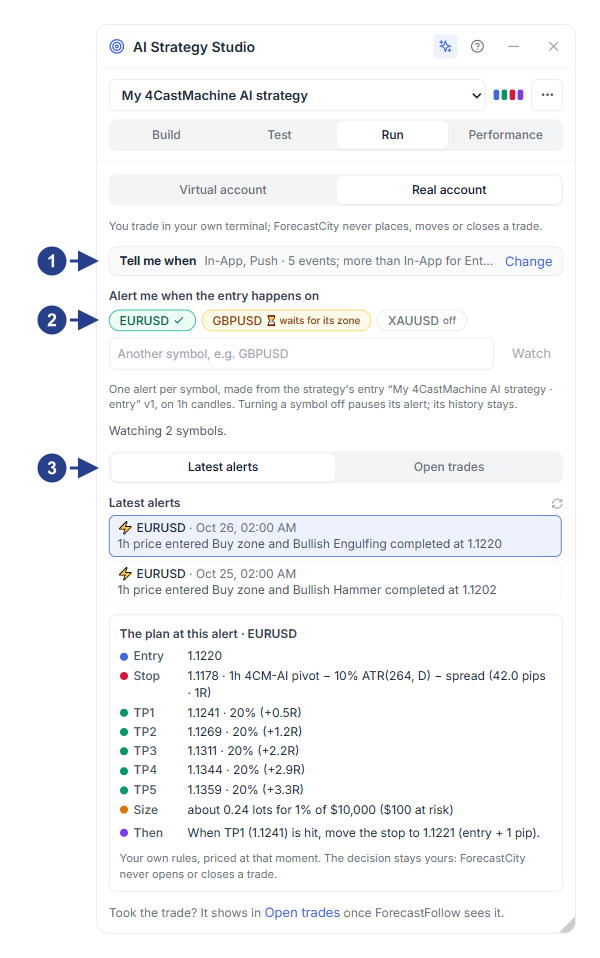
Tell me when notification bar: Click Change to choose which channels (in-app, push, email, Telegram, MetaTrader) notify you for entry, take profit, break-even, stop loss, and trade close.
Watched symbol pills: Add symbols such as
EURUSDorXAUUSD. If a symbol does not have an active zone yet, its pill showswaits for its zoneand starts watching as soon as the zone forms.Latest alerts and Open trades tabs: Review fired trading plans and track active trades with break-even reminders on the chart.
When an entry alert fires, click it under Latest alerts to read The plan at this alert card with your exact Entry price, Stop price (1R), TP1 to TP5 targets, lot Size, and Then break-even rule:
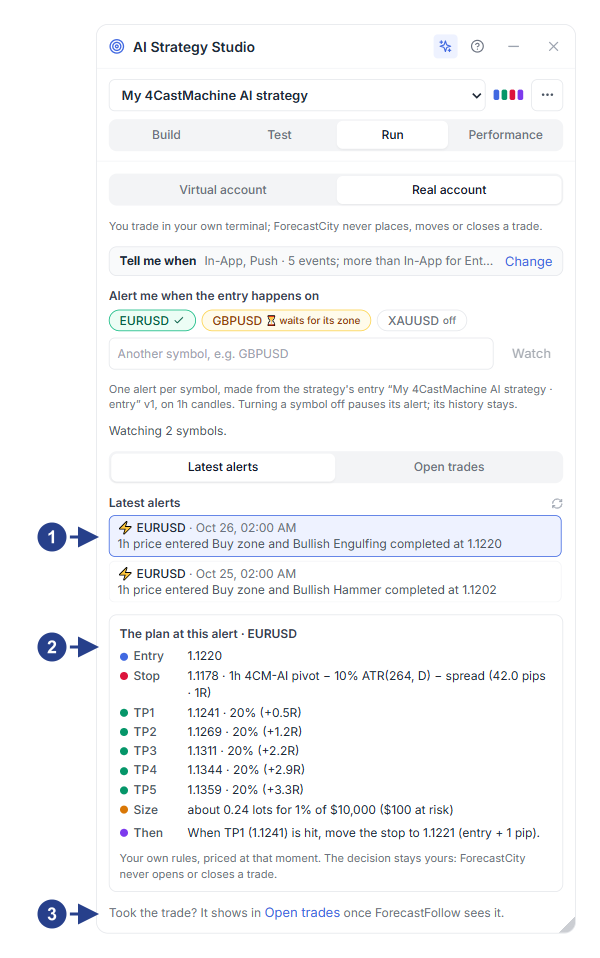
Recent fired alerts list: Every confirmed zone + candle setup across your watched symbols.
The plan at this alert card: Complete numerical trading plan ready to execute.
Open trades link: Follow the live trade and receive automatic target and break-even notifications.
How do I forward test on a Virtual account and audit in the Journal?
Before risking real money, switch the Run tab in AI Strategy Studio to Virtual account. AI executes your strategy live on real-time market prices with realistic spread, commission, and swap costs, and runs a parallel shadow variant:
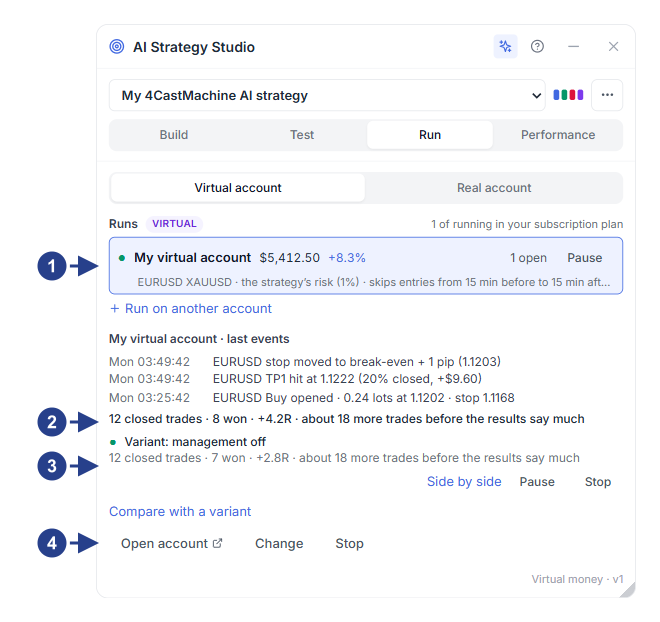
Virtual account switch and active runs: Pause, resume, or open any virtual account run.
Live forward-test summary: Track win rate, net profit, and recent virtual trades in real time.
Compare with a variant: Run parallel shadow variants (for example, comparing
Break-Evenon vs. off) on the exact same entries.Run action buttons: Open the full virtual account page in AI Trading Journal.
When you trade on a connected MetaTrader account via ForecastFollow or on a Virtual account, the Strategy check card in AI Trading Journal grades every closed trade part by part (Entry, Stop Loss, Take Profit, Management, and Risk) and shows the exact dollar impact of any rule you broke:
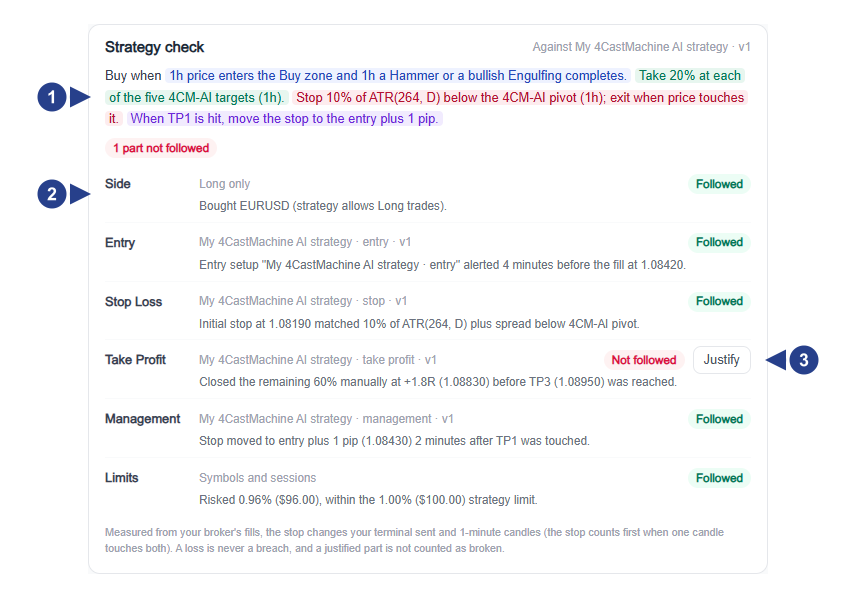
Part-by-part rule check: Shows which strategy parts matched your plan and which parts deviated.
Dollar impact of manual deviations: Reveals how much money closing early or moving a stop cost or saved you compared to the shadow trade.
What markets and timeframes does 4CastMachine AI cover?
4CastMachine AI covers 125 symbols across four asset classes on eight timeframes:
Supported markets (125 symbols):
54Forex pairs,38Cryptocurrencies,9Commodities (including GoldXAUUSD, SilverXAGUSD,BRENT,WTI, and Natural GasNGAS), and24Indices (16major stock indices such asUS100,US500, andGER40, plus the8proprietary4Xcurrency strength indices).Supported timeframes (8 timeframes): Forex pairs are forecasted from
5mup toM(5m,15m,30m,1h,4h,D,W,M). Cryptocurrencies, Commodities, and Indices are forecasted from15mup toM.Where no forecast is drawn: The
1mchart is a price-only chart on all markets, and individual company Stocks do not carry 4CastMachine AI forecasts. In Symbol Search, tick Supported by 4CastMachine to filter for supported symbols.
What are the three golden risk rules for every forecast trader?
Even the highest-probability multi-timeframe setup is still a probability, never a certainty. Follow these three rules on every trade:
Risk only 1% to 2% of your account balance per trade: Set your risk percentage in AI Strategy Studio so your lot size shrinks automatically when a stop loss is wider (such as before news or on a higher timeframe).
Never enter without both a zone and a confirming candle: If price slices straight through the Buy zone and breaks the Pivot without forming a reversal candle, your patience just saved you a full stop loss (
1R).Practice on a Virtual account first: Run the 4CastMachine AI strategy (or Trend Hunter Strategy) on a Virtual account until you have completed at least
30trades and verified your discipline on the Strategy check card.