
One alert from several checks
Add rows when one threshold does not describe what you want to watch. Every row belongs to the same alert and they produce one result together. Adding a row never creates a second alert that fires on its own.
Which combinations you can build depends on your plan. A draft with more than one condition may need a plan that includes multi-condition alerts.
Every row has its own join
Row two onwards starts with its own and or or. Changing it changes that row only, never its neighbours. Press + Add condition for a new row at the end, or press Enter in a box you type into to add a row right below that one, inside the same parentheses.
When a rule mixes the two, and is checked before or, the same way arithmetic does multiplication before addition. So "A or B and C" means A, or B and C together. You never have to work that out in your head: the editor draws the parentheses it implies, in the rows, in the summary and in the automatic message.
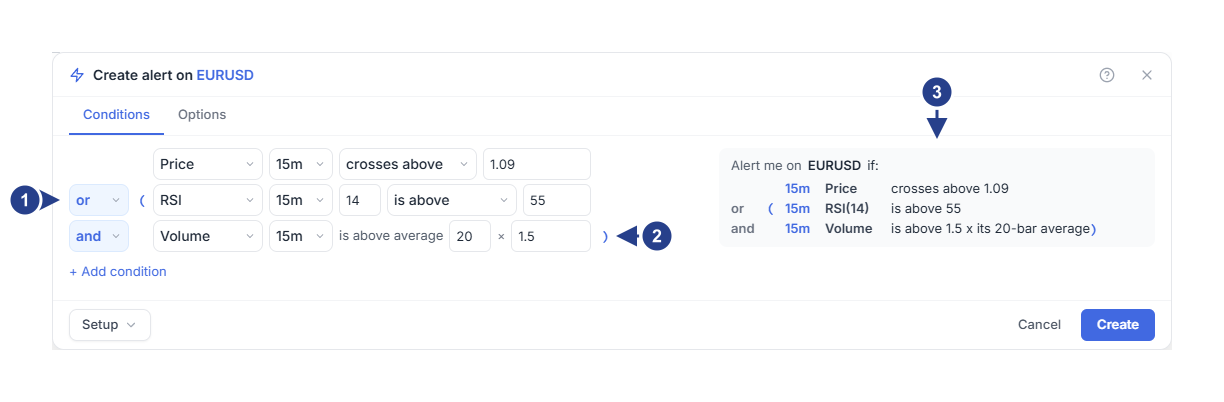
Each row's own join. Changing one never changes another.
The parentheses the editor drew, because and is checked before or.
The summary reads the rule back with the same parentheses.
Put rows in parentheses yourself
When you want the or to go first, group those rows yourself. Hover the first of them and press ( ), "Put in parentheses with the next row". The pair gets parentheses that stay where you put them, and the same button on that row then reads Remove parentheses.
Parentheses the editor drew have no button: they follow from the joins, so change an and or an or to change them. Hover the grey (i) on a row for the same explanation in the editor.
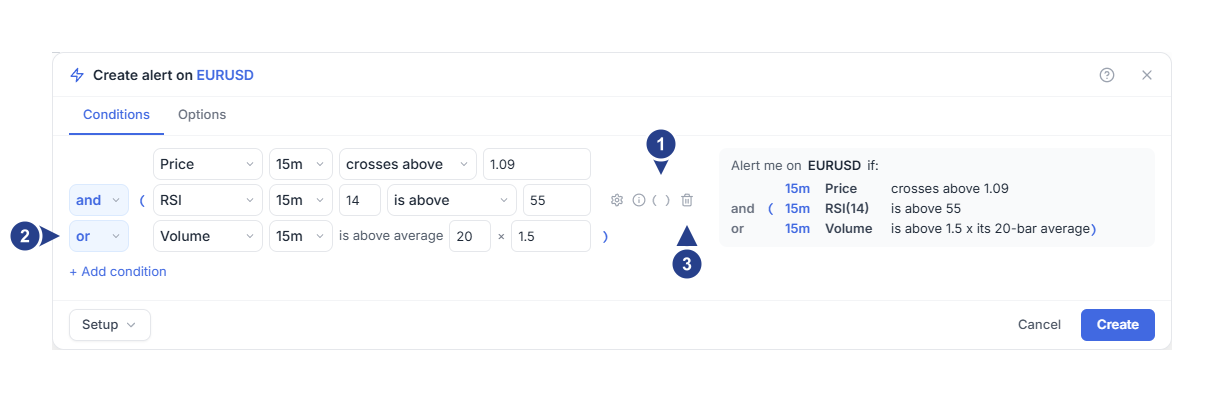
( ) on a row puts it in parentheses with the next row, or removes the parentheses it opens.
Inside the parentheses the join is or, so either row is enough.
The bin removes a row.
Example: a crossing with a choice of filters
Suppose a price crossing should only reach you while either RSI or volume confirms it.
Start an alert on the symbol.
First row: Price, timeframe 15m, crosses above, value 1.09.
Press + Add condition. Second row: join and, RSI period 14 on 15m, is above 55.
Press + Add condition again. Third row: join or, Volume on 15m. The row completes itself with is above average, 20 and 1.5.
Read the summary. Because and goes first, it currently says "the crossing and RSI, or volume alone", which is not the rule you want.
Hover the RSI row and press ( ). The RSI and volume rows are now in your own parentheses and the summary reads "the crossing, and RSI or volume".
On Options, choose Once per bar close and save.
The filters are states and the crossing is the event, so the alert fires at the close where the crossing happens while at least one filter holds.
Two events that can never coincide
A crossing, a completed pattern and a range entry are moments. They are true only inside the round that produced them: one bar close of one timeframe, or one live tick for a line.
So two moments on different timeframes joined by and can never be true together, and an alert built that way would wait for ever. The editor says so and keeps Create disabled until you use or instead, or change one of them into a condition that stays true.
Two moments on the same timeframe are fine: two candlestick patterns can complete on the same candle. The rule is about the round, never about the timeframe alone.
Limits worth knowing
One alert holds up to ten conditions; an eleventh row is refused with "An alert can hold up to 10 conditions. Remove one." Parentheses can nest a few levels deep. Past that the editor says "These parentheses nest deeper than alerts support" and asks you to remove a pair or change an and/or. When a rule stops being readable, split it into two alerts instead.
Alerts saved before this editor may still use at least N of or weighted for a group. They keep working and open with that word and its threshold on the row; new rules are built from and, or and parentheses.
Mixing in a 4CM-AI row
A 4CM-AI row can share an alert with technical rows, but it must be joined to them with and, because the engine joins the forecast part and the technical part that way. Put technical alternatives in parentheses and use or inside them.
The 4CM-AI rows themselves share one join: if some are joined with and and others with or, the editor asks you to "Put all 4CM-AI conditions in one group with one and/or between them". Each message names exactly what to move.
After saving, use Edit to read the whole rule again, and Log to review events. Continue with timeframes, events and repeats before you change how often an alert may fire.